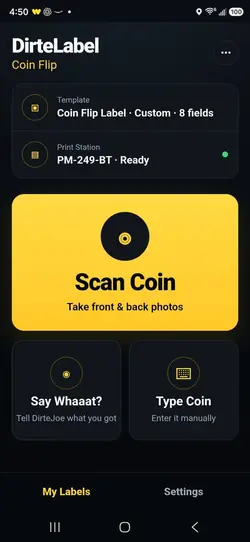
Start from Coin Flip
Choose Scan Coin, Say Whaaat?, or Type Coin depending on what you know.

Photograph it, say it, or type it. DirteLabel helps identify the coin, fills the useful numismatic details, and sends a clean label to your thermal printer.

HOW COIN FLIP WORKS
Set up the Windows print station once. After that, Coin Flip is designed to be used from your phone while the printer stays connected to your PC.
Choose Scan Coin, Say Whaaat?, or Type Coin depending on what you know.
Center the reverse in the circle and keep the full edge visible.
Take front and back photos, or tell DirteJoe what you have with Say Whaaat?.
Check the year, mint mark, and type before we look it up.
Review the year, mint mark, coin type, and issuer before DirteLabel looks up the catalog details.
Review the populated fields and send the finished flip label to your paired Windows Print Station.
THREE WAYS IN
Scan the coin when it is in front of you, speak naturally with Say Whaaat?, or type the coin when you already know the details.
Best when you have the raw coin in front of you. Photograph the obverse and reverse so DirteLabel can use both sides for identification.
PHOTO RECOGNITIONAlready know the coin? Say something like “1912-D Barber half dollar” and answer only the clarification DirteLabel needs.
VOICE INPUTEnter the description manually when you want full control or already have the identifying details in front of you.
TEXT INPUTWHAT YOU NEED
You only need the free account, a Windows computer for the Print Helper, a thermal printer, and the right square labels.
LABEL ROLLS
Coin Flip is designed around a 1.75-inch square physical label. This is the label-roll option currently recommended for testing and use with DirteLabel.
THERMAL PRINTERS
We are testing thermal printers ourselves before recommending them. Models will be added here only after they have been used with the Print Helper and physical Coin Flip labels.
ONE-TIME SETUP
A new Coin Flip user starts on the website so the printer can be connected correctly. Once setup is complete, scan the QR code and use Coin Flip from your phone.
Your real setup screen generates a QR code that opens the mobile Coin Flip login.
COIN FLIP HELP
Yes. Coin Flip is available with a free DirteLabel account. No credit card or live-selling subscription is required.
Yes. The recommended workflow is to perform the one-time printer setup on a Windows PC, then use Coin Flip from your phone. Your phone sends the print job to the paired Windows Print Station.
The DirteLabel Print Helper runs on Windows and communicates with printers installed on that computer. This lets a phone submit jobs without needing a direct mobile-printer connection.
The physical Coin Flip label is 1.75 × 1.75 inches (44.45 × 44.45 mm), designed for use with standard 2×2 coin flips.
Yes. Coin Flip supports U.S. and world-coin identification. Less common coins may require a clarification before a compatible catalog record is selected.
Yes. Start with the included Coin Flip design or use the DirteLabel Label Studio to create and save your own layout.
We are testing printers before publishing recommendations. The tested models will be added to this page as they are validated with Coin Flip and the Windows Print Helper.
Not yet. Whatnot live-label automation is available now, and eBay Live integration is coming soon.
COIN FLIP · FREE
Start with a free account. Set up your printer once. Then identify and print Coin Flip labels from your phone.